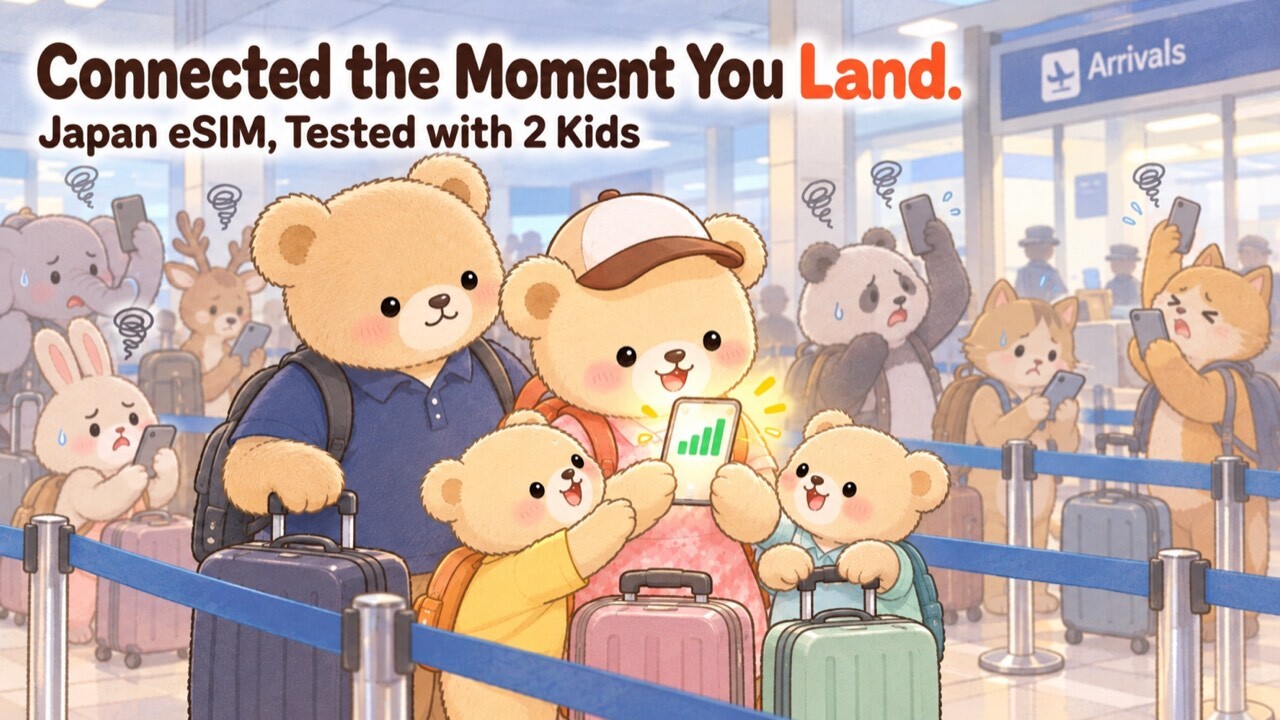
Planning a family trip to Japan? 🌸 The excitement is real — but so is the stress of landing at a Japanese airport with exhausted kids and no internet connection.
“I absolutely cannot wait in a long line for Pocket WiFi with a crying toddler…”
“I don’t want to carry around a heavy router and worry about its battery dying!”
I get it. I’ve been there. And after personally testing Airalo’s Japan eSIM across the Shinkansen, Tokyo Station underground, and the Tokyo Disney Resort area in June 2026 — I can tell you with real data: Airalo is the easiest, most reliable choice for families visiting Japan. 🐻✨

I ran real speed tests on the Shinkansen, inside Tokyo Station, on the Keiyō Line to Disneyland, and inside Tokyo Disney Resort hotels — with actual numbers. No guessing, no fluff. Just honest results from a mom who traveled solo with her research gear! 🐻📊
🇯🇵 この記事を日本語で読む
※This article contains affiliate links. We may earn a commission at no extra cost to you.
- 🏆 The Verdict: Why Airalo Is the Easiest Choice for Families in Japan
- 🆚 Airalo eSIM vs. Pocket WiFi: Which is Better for Families?
- 💴 Airalo Japan eSIM Plans & Prices (2026)
- 🚀 Real Speed Test Results: Japan (June 2026)
- 📶 Does Airalo Allow Hotspot Tethering in Japan? (Yes — I Tested It)
- 📱 Step-by-Step Guide: How to Buy & Set Up Airalo
- 🔋 Running Out of Data? Top-Up in 1 Minute!
- ⚠️ 2 Common Myths About eSIMs
- ❓ FAQ: Your Top Questions Answered
- ✈️ Conclusion: Travel Light and Stress-Free with Airalo!
🏆 The Verdict: Why Airalo Is the Easiest Choice for Families in Japan
Let me give you the conclusion right away! If you want to “travel light” and “save your sanity” traveling with kids, an Airalo eSIM is overwhelmingly easier and cheaper than renting a Pocket WiFi! 🐻✨
✅ Instant Internet: The moment the plane lands, your phone is connected!
✅ Zero Waiting: Skip the airport counter lines (let the kids stretch their legs!).
✅ Travel Light: No heavy router or extra chargers in your diaper bag.
✅ Tethering Allowed: Share your data so your kids can watch YouTube Kids on their iPads!
✅ Real Speed Data: Tested on the Shinkansen, Tokyo Station & Disney area in June 2026!
Reader-Exclusive Airalo Promo Codes
Cheaper than pocket WiFi — no contract, no pickup
⚠️ The code goes in automatically — if you don’t see it, enter it at checkout
🎁 First-time users (15% OFF)
MAMABEARNEW
🎁 Existing users (10% OFF)
MAMABEAR
*Affiliate links · Instant delivery · No contract
🆚 Airalo eSIM vs. Pocket WiFi: Which is Better for Families?
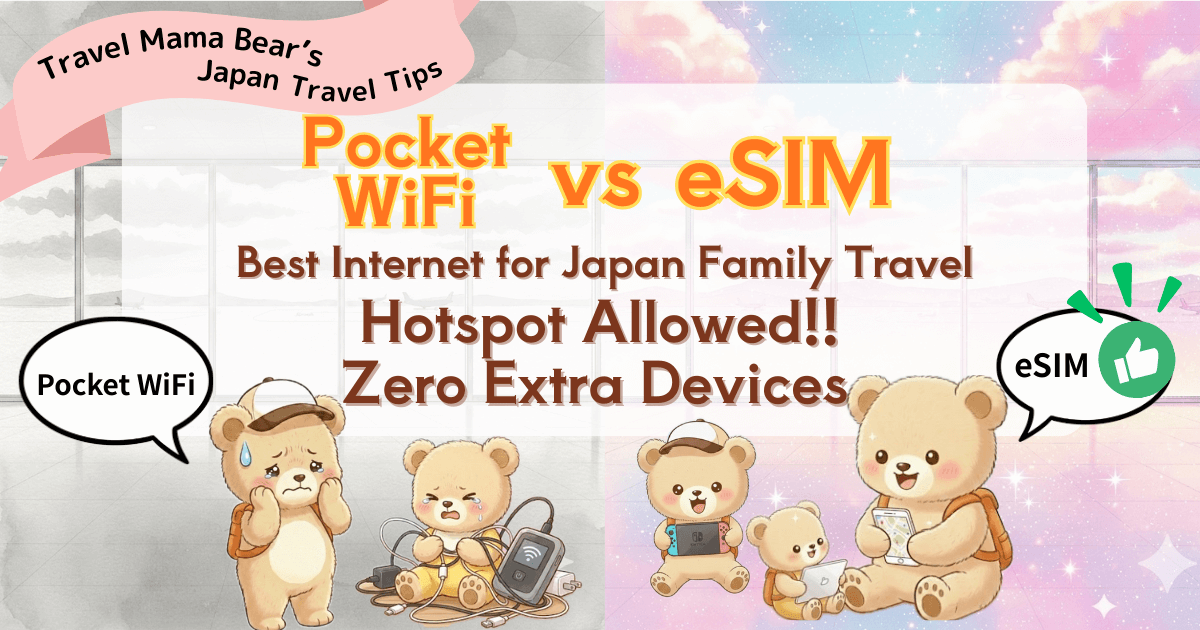
Renting a Pocket WiFi used to be the standard for Japan travel, but today, using a built-in “eSIM” is the absolute winner.
📊 Airalo vs. Pocket WiFi (Family Travel Comparison)
| Comparison Point | ✨ Airalo (eSIM) ✨ | Pocket WiFi (Router) |
|---|---|---|
| Best for Families | ◎ Excellent (Overwhelmingly easy!) | △ Not Recommended (Adds luggage & hassle) |
| Price (Value) | Cheap (Prepaid, starts at a few dollars) | Expensive (Usually a flat daily rate) |
| Weight & Bulk | Zero! (Just your own smartphone) | Heavy (Router, charger, cables, pouch) |
| Pickup & Return | Zero! (App setup only, no lines) | Tedious (Long airport lines before & after flights) |
| Daily Charging | No (Only charge your own phone) | Yes (Must charge the router every single night…) |
| Loss/Damage Risk | Zero! (No penalty fees to worry about) | High (Expensive penalty fees if lost 😭) |
Your bag is already stuffed with diapers and snacks; the last thing you want is a heavy router! Plus, waiting in the “Pickup/Return Line” at the airport while keeping an eye on your energetic kids is pure torture… To protect your energy and time, I absolutely recommend Airalo! Want to see every option side by side first? Read my Japan eSIM & Pocket WiFi comparison guide too. 🐻✨
Why Airalo is a “Life-Saver” for Traveling Moms
1. No More Exhausting Airport Lines!
After a long flight, the kids are at their limit. 😭 With Airalo, the moment the plane lands and the seatbelt sign turns off, I’m already connected. I can skip the crowd, head straight to a taxi or a cafe, and start your trip with an onigiri (rice-ball) break 🍙 instead of a 30-minute wait!

👉 The full price list is right below 👇 — and when you’re ready, my reader code MAMABEARNEW takes 15% off on Airalo’s Japan eSIM plans. ✨
💴 Airalo Japan eSIM Plans & Prices (2026)
In the Airalo app, the Japan eSIM is called “Moshi Moshi” — that’s the plan name you’ll see when you search for Japan. It runs on the SoftBank network (the same network I speed-tested below). These were the unlimited-data prices when I checked Airalo’s official site in September 2026:
| Unlimited data | Price* |
|---|---|
| 3 days | ¥1,900 (≈US$12) |
| 5 days | ¥2,800 (≈US$18) |
| 7 days | ¥4,350 (≈US$28) |
| 10 days | ¥5,650 (≈US$36) |
| 15 days | ¥7,850 (≈US$50) |
| 30 days | ¥11,250 (≈US$72) |
Whichever plan you choose, my reader code MAMABEARNEW takes 15% off at checkout, and it goes in on its own if you use the buttons in this article (see Step 1 below for the screens). That’s the cost side — but the bigger question is whether the network is actually good. So I went and measured it:
🚀 Real Speed Test Results: Japan (June 2026)
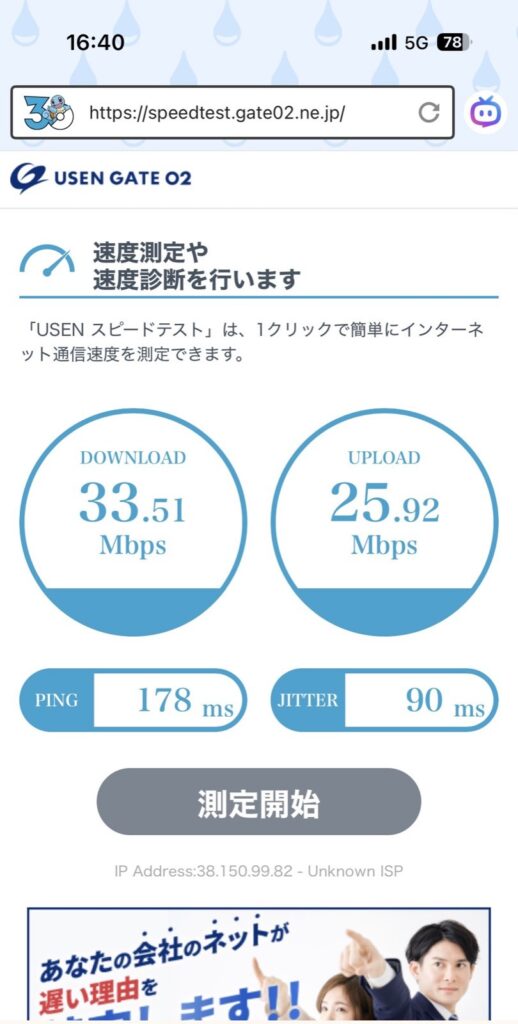
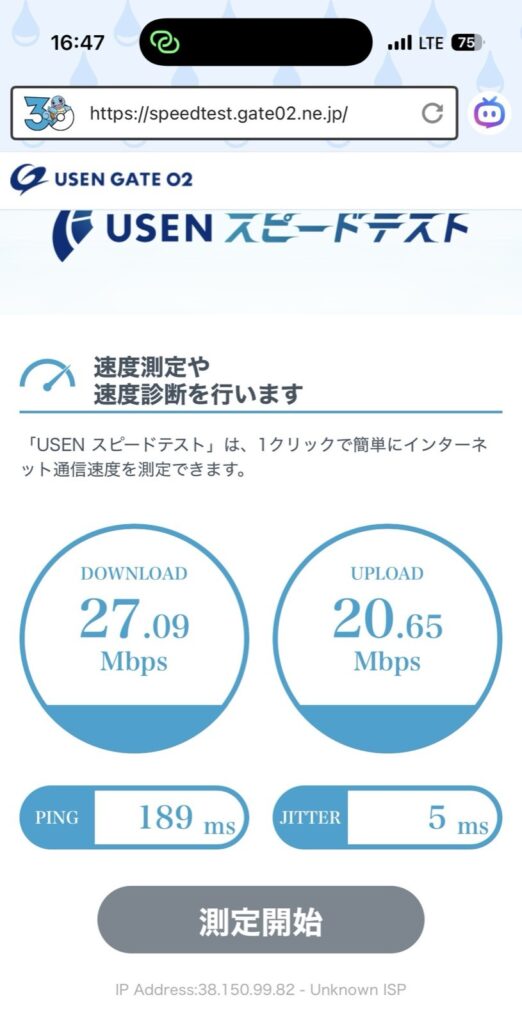
“Is the connection actually good in Japan?” Great question — and I have real answers. In June 2026, I personally ran speed tests with Airalo’s Moshi Moshi plan (SoftBank network) in the exact places visiting families actually use it. I live in Japan — though not in Tokyo — so this was a dedicated research trip: I went to Tokyo specifically to measure real-world speeds for this blog. Here are the actual numbers:
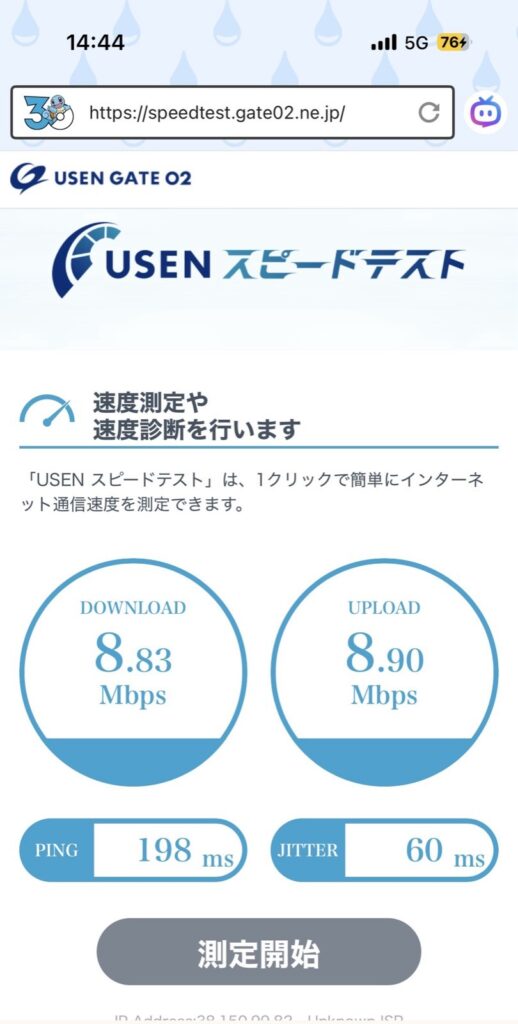
| 📍 Location | ⬇️ Download | ⬆️ Upload | 📡 Jitter | ✅ Verdict |
|---|---|---|---|---|
| Shinkansen (moving, 2nd test) | 8.83 Mbps | 8.90 Mbps | 60ms | Maps, SNS, YouTube: No problem! |
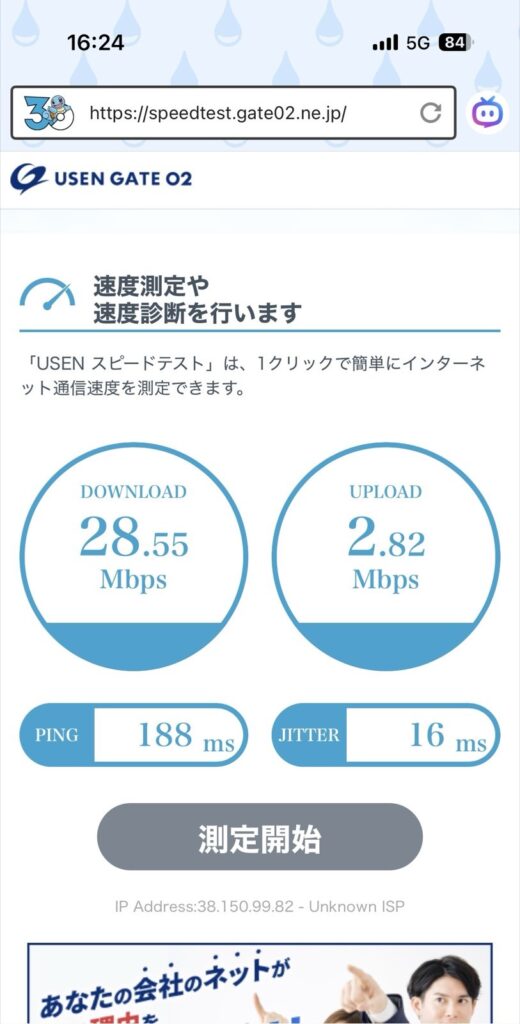
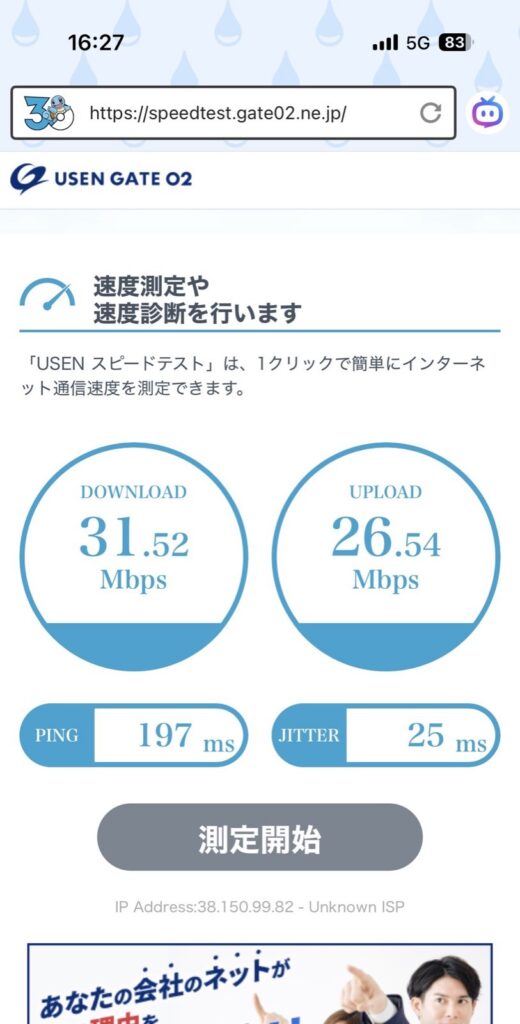
| Tokyo Station (underground walkway) | 28–33 Mbps | 2–26 Mbps | 16–25ms | Smooth & stable throughout |
| Keiyō Line to Maihama (underground) | 27 Mbps | 20 Mbps | 5ms | Most stable of the whole trip! 🏆 |
| Tokyo Disney Resort area (outdoor) | 20–29 Mbps | 21 Mbps | 20ms | No issues at all |
| Fantasy Springs Hotel (room) | 26–41 Mbps | 5 Mbps | 82ms | Fast downloads, good for browsing & video |
| Ikspiari Shopping Mall | 11–28 Mbps | 9–25 Mbps | 9–14ms | Super stable indoors on all floors |
| Tokyo Station underground (after top-up) | 160 Mbps | 42 Mbps | 15ms | 🚀 Blazing fast after top-up! |
📖 What do these numbers actually mean?
⬇️ Download speed guide:
・ 1–5 Mbps: Basic browsing & maps ✅
・ 5–10 Mbps: SNS, LINE calls, standard YouTube ✅
・ 10 Mbps+: HD video, smooth tethering ✅✅
・ 20 Mbps+: Fast & comfortable for everything ✅✅✅
⬆️ Upload speed guide:
・ 1 Mbps+: LINE messages & photos ✅
・ 5 Mbps+: Instagram stories, video calls ✅✅
・ 10 Mbps+: Fast photo/video uploads ✅✅✅
📡 Jitter guide (stability):
・ Under 30ms: Excellent — rock solid 🏆
・ 30–80ms: Good — no real-world issues ✅
・ 80–150ms: Acceptable — slight delay possible ⚠️
・ 150ms+: Unstable — buffering may occur ❌
💡 In plain English: even the “weakest” result in my tests (Download 8.83 Mbps on the moving Shinkansen) was more than enough for Google Maps, LINE, and YouTube. You won’t notice any problems in daily family travel use!
📶 Does Airalo Allow Hotspot Tethering in Japan? (Yes — I Tested It)
Short answer: yes. Airalo officially allows Personal Hotspot tethering in Japan at no extra cost — no hidden blocks, no special settings. I confirmed it in my June 2026 field test, tethering an older phone on the Shinkansen, in my hotel room and around Tokyo Disney Resort. Here are the honest results:
💡 Pro Tip: Many “unlimited” travel SIMs secretly block tethering. Airalo officially allows Personal Hotspots — confirmed in my June 2026 Japan test! ✨
I tested hotspot tethering to an older model smartphone throughout the trip. Here’s my honest breakdown:
| 📍 Location | Tethering to older phone |
|---|---|
| Shinkansen (above ground) | ✅ YouTube playable |
| Keiyō Line (underground) | ⚠️ YouTube not loading — but this was because my data ran out, NOT an Airalo problem! |
| Keiyō Line (above ground) | ✅ YouTube playable within seconds of emerging |
| Fantasy Springs Hotel (room) | ✅ YouTube playable — more stable than the hotel WiFi! |
| Ikspiari 2F & 3F | ✅ YouTube playable, slight delay on 1F |

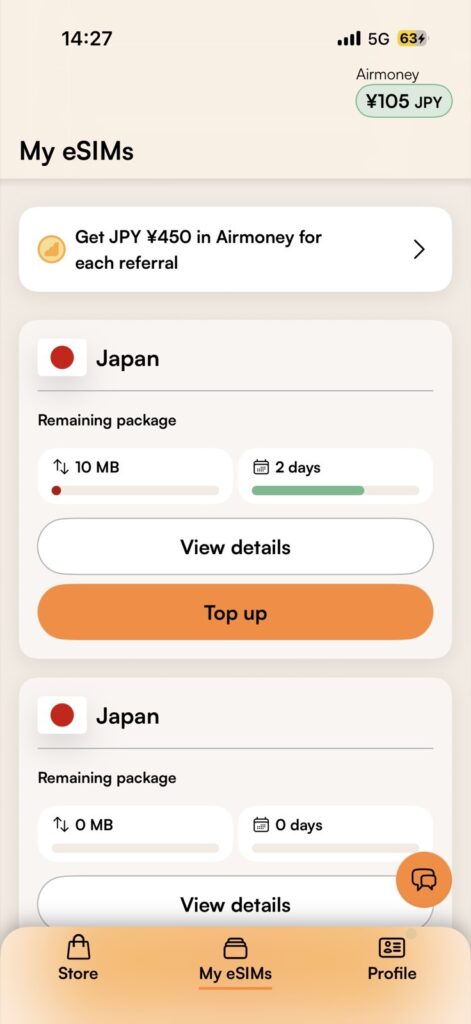
💡 Important lesson from my trip: When tethering suddenly stopped working on the Keiyō Line, I panicked thinking it was an Airalo signal issue — but it turned out my data had simply run out! After topping up in the app (under 1 minute!), everything worked perfectly again. Always check your remaining data in the app before blaming the signal! 😅
Reader-Exclusive Airalo Promo Codes
Cheaper than pocket WiFi — no contract, no pickup
👉 Buy Your Japan eSIM⚠️ The code goes in automatically — if you don’t see it, enter it at checkout
🎁 First-time users (15% OFF)
MAMABEARNEW
🎁 Existing users (10% OFF)
MAMABEAR
*Affiliate links · Instant delivery · No contract
📱 Step-by-Step Guide: How to Buy & Set Up Airalo
Step 1. Buy Your Plan on the Airalo Site (Your Code Applies on Its Own)
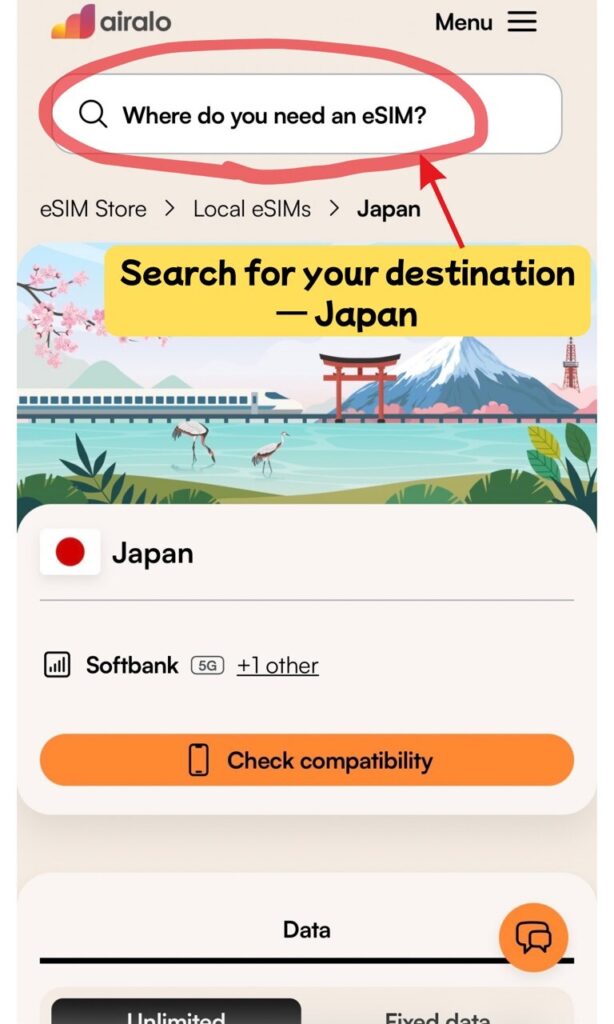
Open the Airalo site with the button below, search for your destination (Japan), and pick the data amount and number of days that suit your trip. You do not need the app yet — the whole purchase happens in your browser.
The screenshots below were taken in October 2026 on the Japan plan page. Prices vary by destination, plan and season, so check the figure shown on the site when you buy.
Affiliate link · going through this button puts the discount code in for you
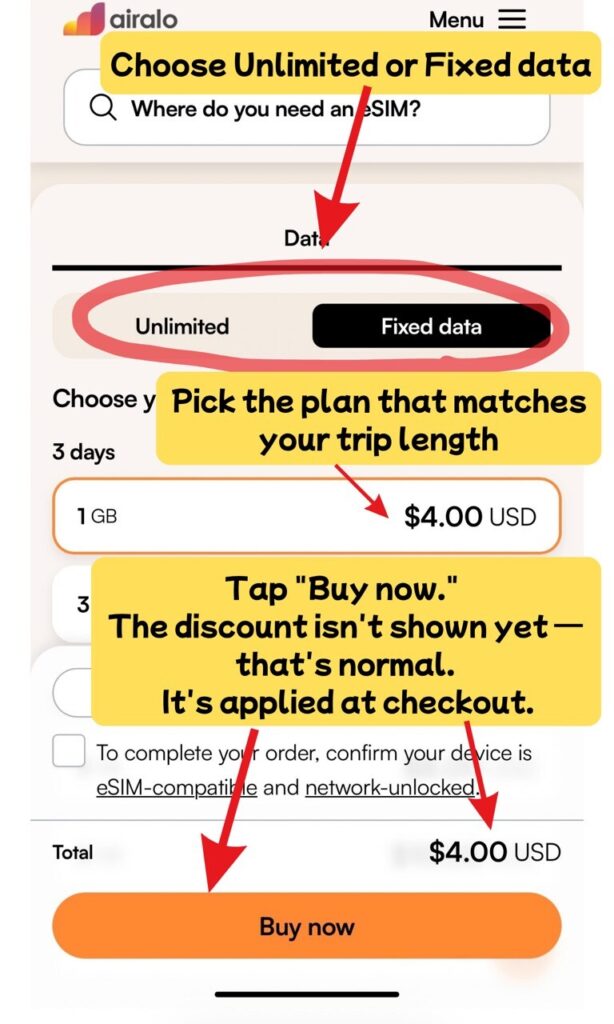
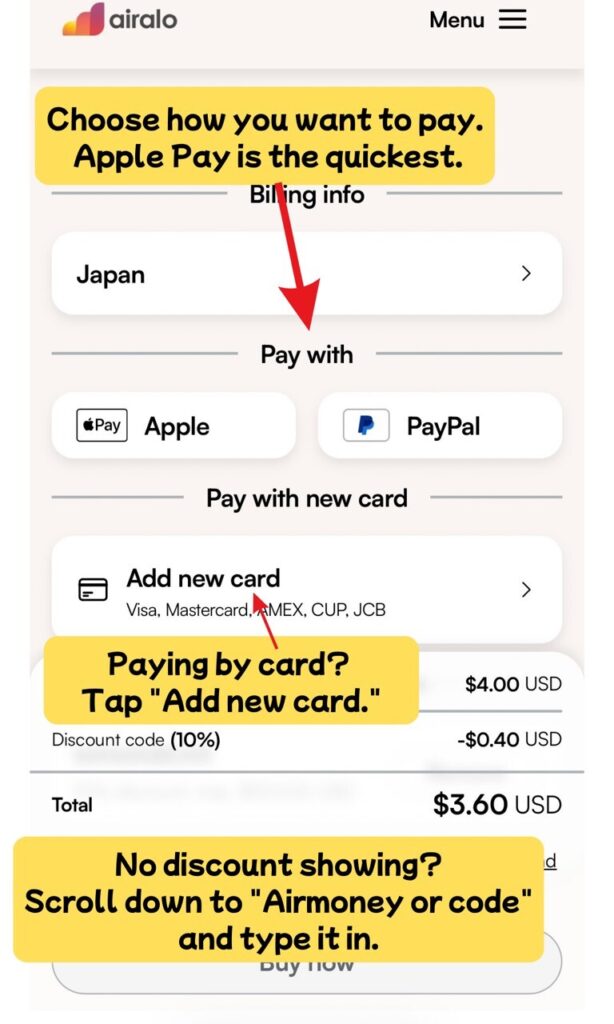
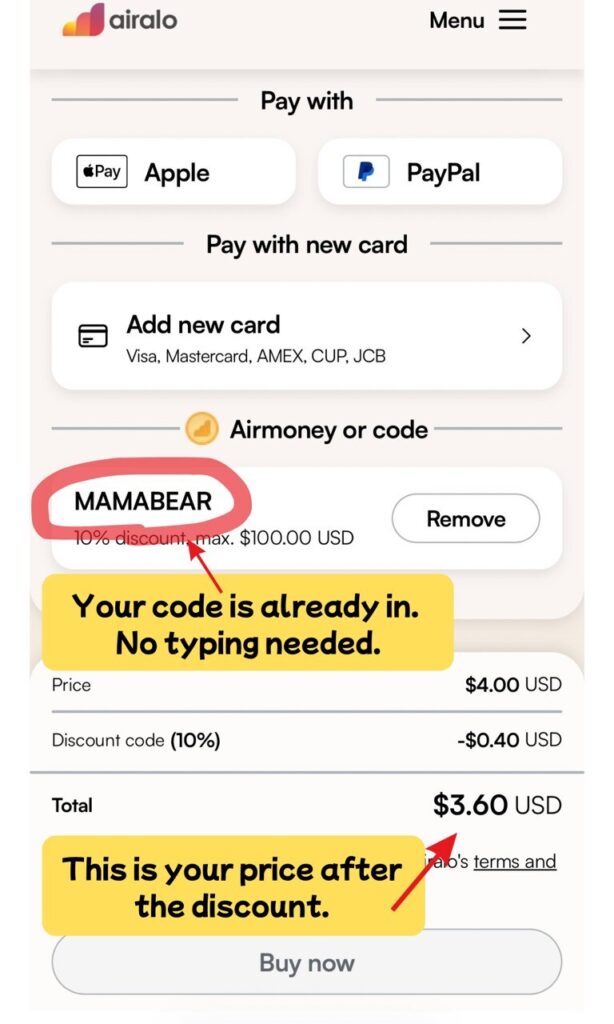
Go through the button above and the discount code is already sitting in your basket when you reach the payment screen. There is nothing to type. Just check that the total has dropped, then pay.
One thing worth explaining: the screenshot shows 10% off because I am an existing Airalo customer, and that is the repeat-user code. If this is your first Airalo eSIM, the same screen will show 15% off instead. Nothing to do on your end — it applies on its own.
💡 If you do not see a discount
Scroll down on the payment screen to the section headed “Airmoney or code” and type the code in there. (Airmoney is just Airalo’s name for store credit — the same box takes promo codes.)
- 🎁 First-time users (15% OFF):
MAMABEARNEW - 🎁 Existing users (10% OFF):
MAMABEAR
⚠️ Check the total before you tap the pay button. Once the order goes through, the discount cannot be added afterwards.
Step 2: Install the Airalo App and Log In with the Same Account
Now get the app. Sign in with the same Apple ID, Google account or email you used at checkout, and the eSIM you just bought is waiting there for you — you do not have to buy anything again.
Affiliate link · works on both the App Store and Google Play
You might be wondering why you need the app at all if you already paid on the website. Installing the eSIM, checking how much data you have left and topping up all happen in the app — that is Airalo’s own process, so you will need it either way. Getting it now saves you doing it at the airport.
Step 3: Installing Your eSIM
Open the app and tap your new eSIM under “My eSIMs.” You will land on the order screen below.
- Tap “Install eSIM / Share” at the bottom of the screen.
- On the next screen, tap “Install eSIM” to begin.
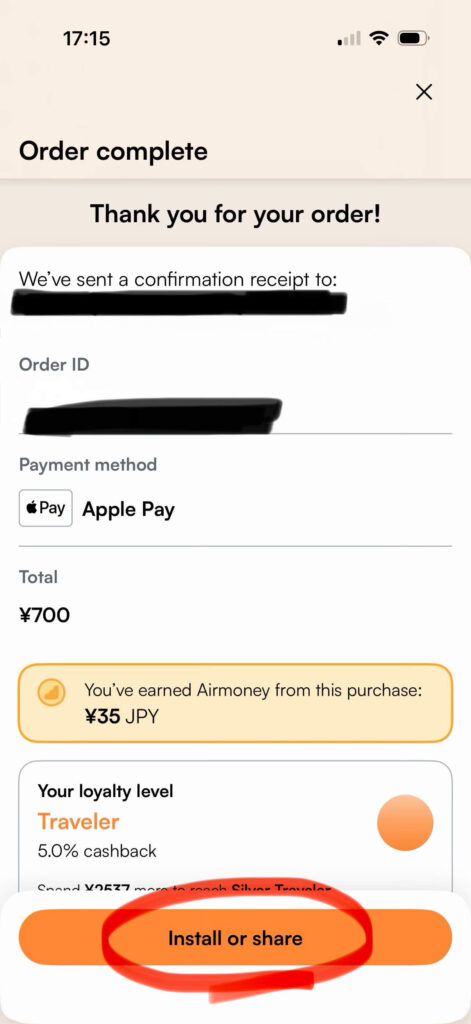
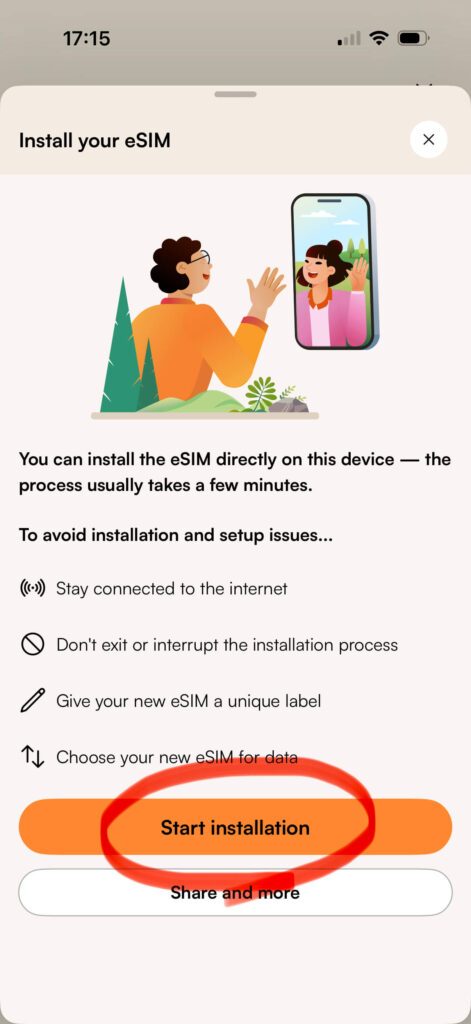
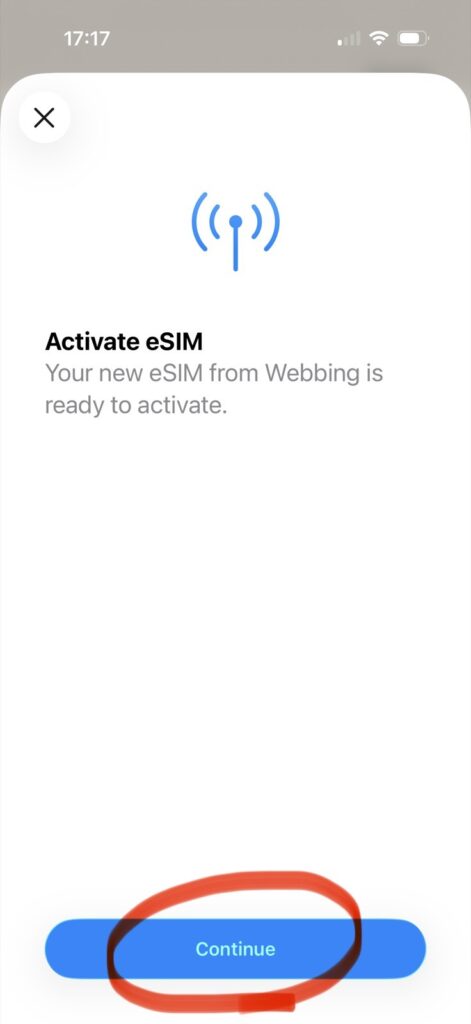
Next, you’ll see the “Activate eSIM” prompt. Simply tap “Continue”.
Note: You might see a message about a “New eSIM from Webbing.” Don’t worry! This is the official Airalo network system — it is perfectly safe to tap “Continue”.
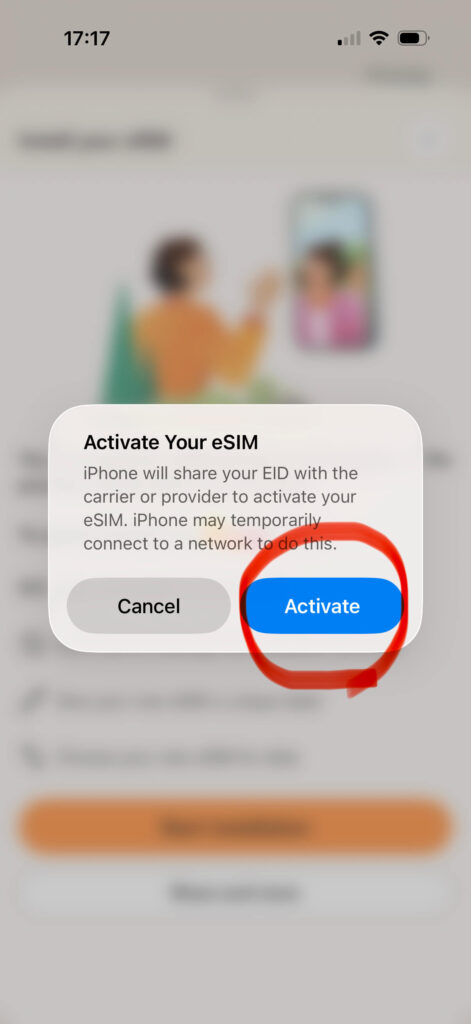
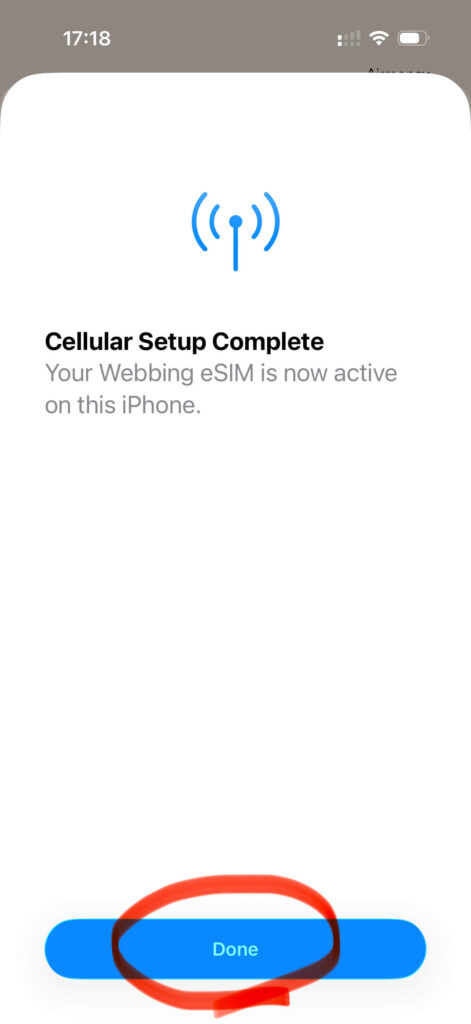
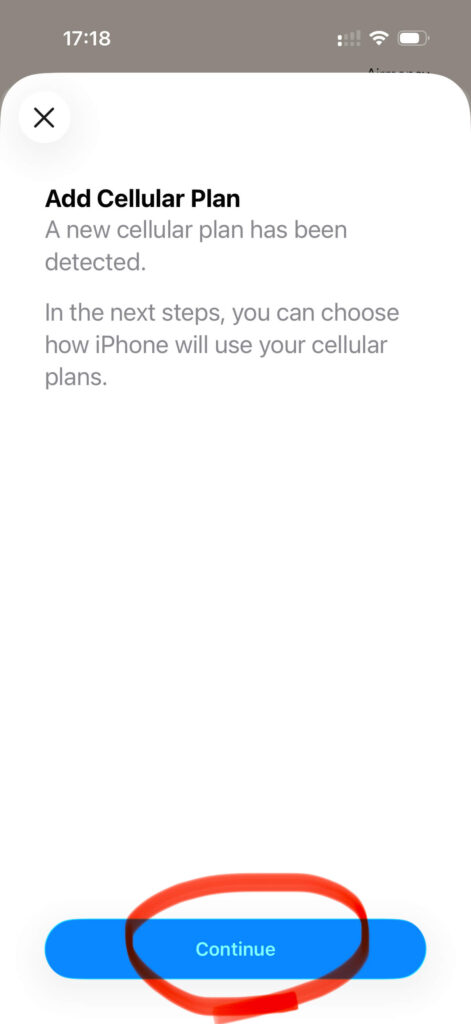
When the “Cellular Setup Complete” screen appears, tap “Done”. Then tap “Continue” on the “Add Cellular Plan” prompt.
Step 4: Label Your eSIM & Turn It On!
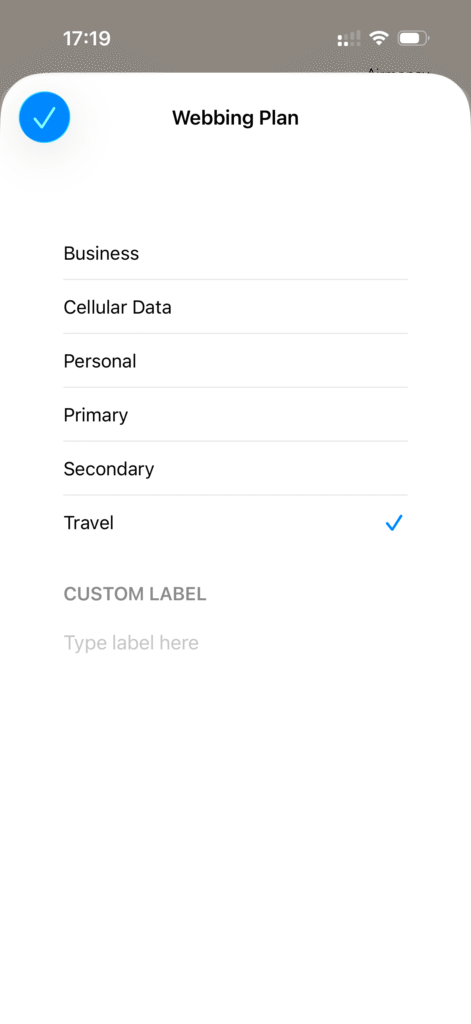
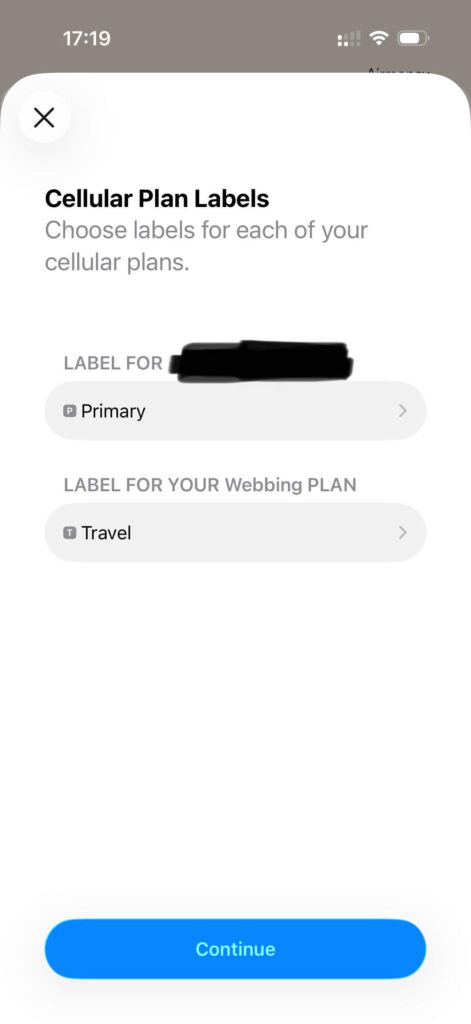
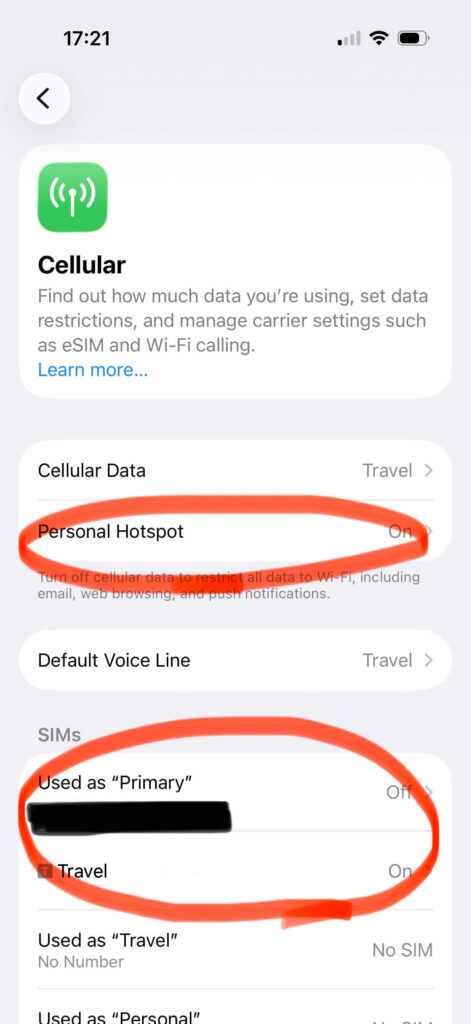
Give your new eSIM a name so you don’t get confused. I recommend choosing “Travel” as the label.
🌍 Ready to Go! Switch to Airalo When You Land
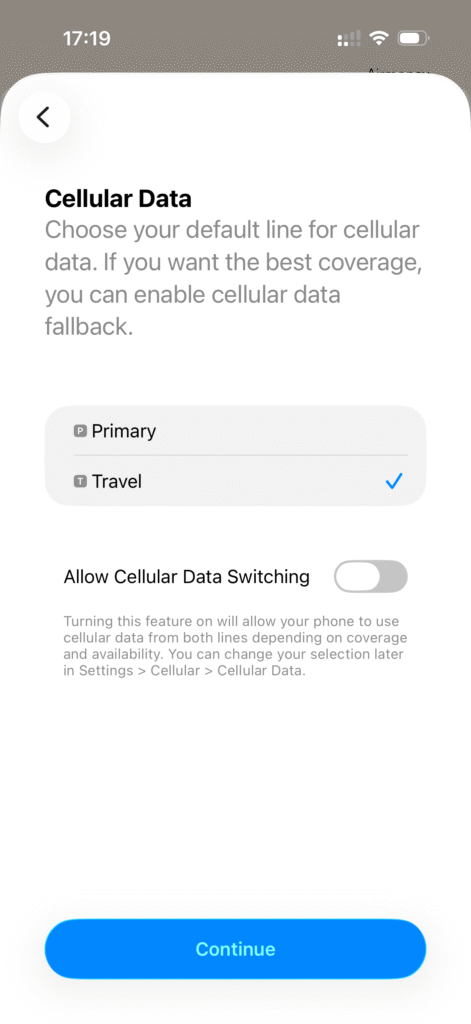
When you land in Japan, simply switch your cellular data to your “Travel” (Airalo) line — and you’re instantly connected! Google Maps, LINE, Instagram — all available the second you step off the plane. No lines, no waiting, no stress. 🐻✨
💡 Need more help?
If you prefer a step-by-step video guide, check out this 1-minute tutorial from Airalo below! 👍
🔋 Running Out of Data? Top-Up in 1 Minute!
Here’s something that actually happened to me on this trip — and it’s an important lesson for every family traveler.
On the Keiyō Line heading to Tokyo Disney Resort, tethering to my older phone suddenly stopped working. YouTube went blank. I started to panic — “Is Airalo broken? Is there no signal underground?!”
Then I opened the Airalo app and saw: only 10MB remaining. My data had simply run out! 😅
I tapped Top-Up, paid with Apple Pay — and within 60 seconds, data was restored. Tethering worked again, YouTube came back on, and the “peace” was restored before I even reached the next station. 🚃✨
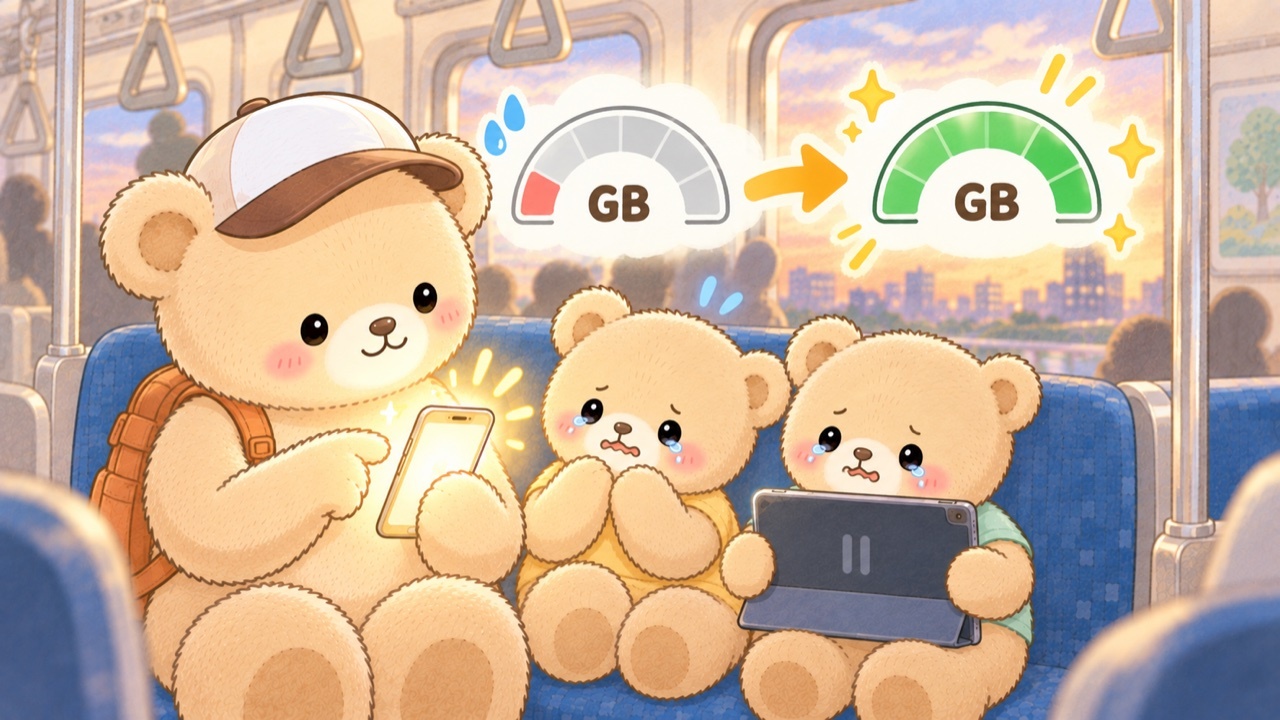
Let me walk you through exactly how that top-up works — it takes under a minute, and you can do it anywhere, even on a moving train.
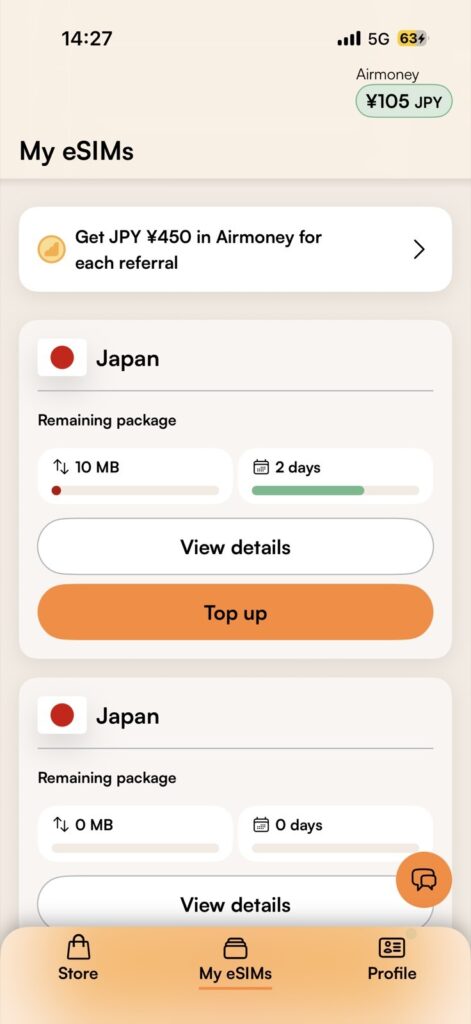
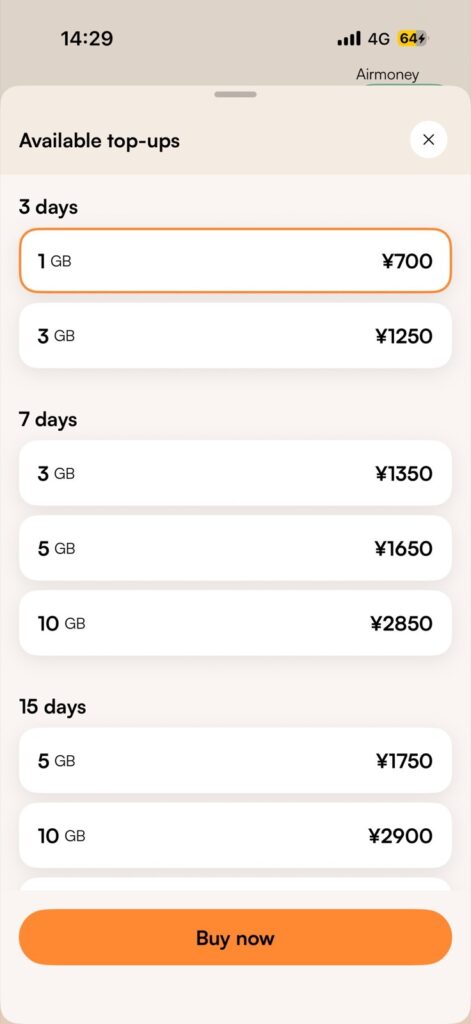
- Open the Airalo app.
- Go to “My eSIMs” and select your Japan eSIM.
- Tap “Top Up” and choose a package (1GB, 3GB, etc.).
- Pay with Apple Pay or credit card. Data restored instantly! ✨
⚠️ 2 Common Myths About eSIMs
Myth 1: “Do I need to remove my physical SIM card?”
👉 No! Keep it in. Modern phones support “Dual SIM.” Keep your home number active for emergencies, and use Airalo for data in Japan.
Myth 2: “Can I use any smartphone?”
👉 No! Your phone MUST be “Carrier-Unlocked” (SIM-free). Check your phone settings or contact your carrier before you fly! 📱🔑
❓ FAQ: Your Top Questions Answered
- QDoes Airalo allow hotspot tethering in Japan?
- A
Yes — confirmed in my June 2026 Japan test! I tethered to an older smartphone throughout the trip, including on the Shinkansen, in hotel rooms, and at Ikspiari (Tokyo Disney Resort shopping mall). YouTube played smoothly in most locations. Just turn on “Personal Hotspot” in your iPhone settings — no extra setup needed. ✨
- QIs Airalo reliable underground in Tokyo?
- A
Yes! In my June 2026 test, the Keiyō Line underground was actually the most stable location of the entire trip — 27 Mbps download, Jitter (connection stability) just 5ms. Tokyo Station underground also showed 28–33 Mbps consistently. The only time I lost connection was when my data ran out (not a signal issue!). After topping up, everything worked perfectly. 🏆
- QHow much data do I need for a Japan family trip?
- A
Honestly, with kids I’d stop counting gigabytes and go unlimited. The Japan plan is sold by trip length — 3, 5, 7, 10, 15 or 30 days — so you just pick the number of days you’ll be here. No data math, and no rationing YouTube on a long train ride. If you’d rather spend less, Airalo also sells smaller fixed-data plans, and a family of 3–4 using maps, messaging and the occasional video usually lands somewhere around 5–10GB a week. Either way, you can top up in under 60 seconds in the app — so you’re never stuck with the wrong choice. ✨
- QDoes Airalo work at Tokyo Disney Resort?
- A
Yes! I tested it around the Bayside Station area, at Fantasy Springs Hotel, and throughout Ikspiari. Speeds ranged from 11–41 Mbps depending on location. Hotel room tethering was more stable than the hotel’s own WiFi! Google Maps, LINE, and browsing all worked without any issues. 🏰✨
- QWhat happens when my Airalo data runs out?
- A
Your connection simply stops — no surprise charges, no automatic billing. Just open the Airalo app, tap “Top Up,” choose a package, and pay with Apple Pay or credit card. Data is restored instantly. I did this on the Keiyō Line while on the move and was back online before the next station! The key is to check your remaining data regularly in the app. 😊✨
- QIs Airalo good for Japan?
- A
Yes — for families it’s the option I recommend after testing it across Tokyo, the Shinkansen and Tokyo Disney Resort in June 2026. Speeds were 8–41 Mbps everywhere I measured, hotspot tethering is officially allowed, and there are no airport lines, routers or return deadlines. The main limits: your phone must be carrier-unlocked, and there’s no phone number (data only — LINE and app calls work fine). ✨
- QWhy does my plan say “Moshi Moshi” — and what is “Webbing”?
- A
Both are completely normal! “Moshi Moshi” is simply the name of Airalo’s Japan eSIM in the app (it’s the playful phrase Japanese people say when answering the phone). And during installation you may see “New eSIM from Webbing” — Webbing is the connectivity partner Airalo uses, so it’s safe to tap Continue. 👍
✈️ Conclusion: Travel Light and Stress-Free with Airalo!
After testing Airalo across the Shinkansen, Tokyo Station, the Keiyō Line, and the Tokyo Disney Resort area — the verdict is clear. For families visiting Japan, Airalo is the smartest, easiest internet solution. 🐻✨
No heavy routers. No airport lines. No daily charging. No penalty fees. Just instant, reliable internet the moment you land — so you can focus on what really matters: making amazing memories with your kids in Japan. 🌸
One last thing — the discount codes below were issued exclusively for readers of this blog. Please do use them: it’s my small thank-you for reading this far. 🐻

Reader-Exclusive Airalo Promo Codes
Cheaper than pocket WiFi — no contract, no pickup
👉 Buy Your Japan eSIM⚠️ The code goes in automatically — if you don’t see it, enter it at checkout
🎁 First-time users (15% OFF)
MAMABEARNEW
🎁 Existing users (10% OFF)
MAMABEAR
*Affiliate links · Instant delivery · No contract
Planning your family trip to Japan? Don’t miss these guides:
- 👉 Japan Train Guide for Families (IC Cards, Strollers & Shinkansen)
- 👉 Baby Essentials in Japan: Diapers, Formula & Baby Food
- 👉 Japan Packing List for Babies & Toddlers
- 👉 Japanese Convenience Stores: A Parent’s Survival Guide
🚙 Connected Online — Now Get Connected to Your Hotel Too
Your eSIM is sorted. Next: skip the train stress with kids and luggage. A private transfer drops your family off right at the hotel lobby — no subway changes, no guessing which exit.
✈️ Flying into NARITA (NRT)?
👉 Max comfort — door-to-door to your hotel
🚙 Book Private Airport Transfer(Narita → Hotel)
👉 Budget-friendly — direct bus with fixed stops
🚌 Book Airport Limousine Bus(Narita)
✈️ Flying into HANEDA (HND)?
👉 Max comfort — door-to-door to your hotel
🚙 Book Private Airport Transfer(Haneda → Hotel)
👉 Budget-friendly — direct bus with fixed stops
🚌 Book Airport Limousine Bus(Haneda)
📚 Keep Planning Your Japan Trip




コメント